
Finance
DebtLens
Make monthly debt check-ins clear, compare payoff strategies, and see progress at a glance.
$2.99
Available on iPhone, iPad & Mac
- iPhone
- iPad
- Mac
Prices can vary by region. The App Store shows the current price.


A closer look
See more of DebtLens.



About DebtLens
Visual Debt Payoff Planner
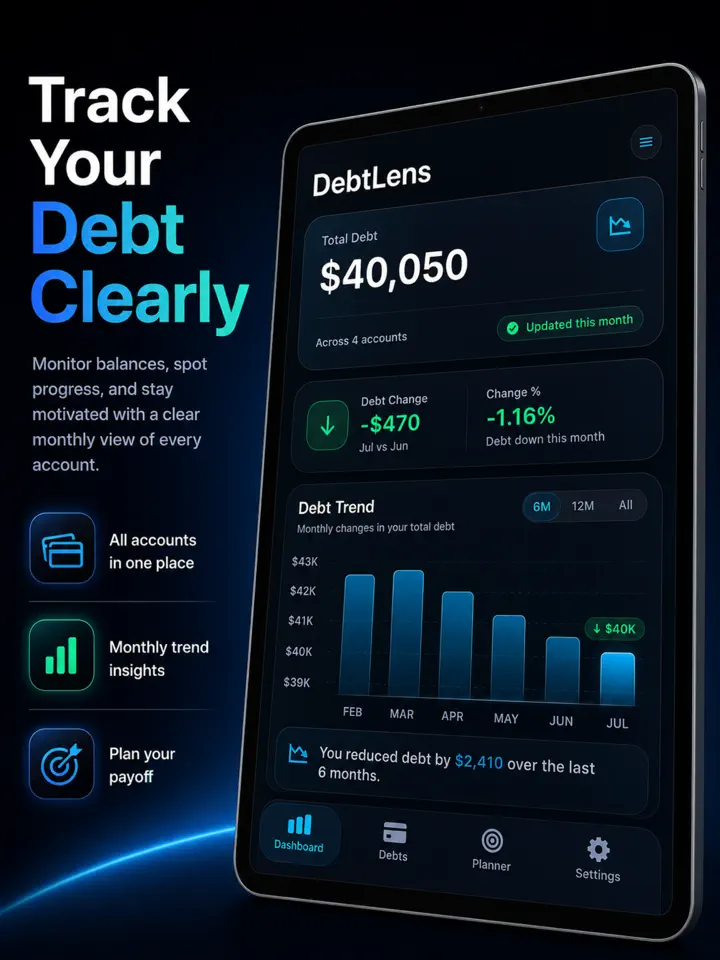
DebtLens turns debt tracking into a quick monthly habit. See total debt, month-to-month movement, and payoff momentum in a focused visual dashboard designed to help you understand the numbers and move on with your day.
Update balances fast
Run a guided monthly check-in for every account. Review the previous balance, enter the latest amount, choose No Change, or mark an account Paid Off. Finish with a clear recap of debt reduced, debt added, and estimated interest.
See progress at a glance
Read the debt trend chart first, then review total debt and recent activity. Tap into accounts for balance history, utilization, payment details, and a full breakdown.
Build a payoff plan
Adjust an extra-payment slider and instantly compare projected debt-free dates and interest. View Snowball and Avalanche side by side, with an informational comparison based on your saved accounts.
Read more
Know each account
Track due dates, APR, minimum and target payments, statement balances, credit limits, and autopay status. Credit cards show utilization, while loans estimate principal and interest.
Private, personal, and portable
Use DebtLens without creating an account, or sign in with Apple to sync through iCloud. Add an optional Face ID or device-passcode lock, schedule a monthly reminder, choose a premium light or dark theme, and export a themed PDF report with the accounts and date range you select.
Payoff dates, interest, and principal estimates are informational projections based on the data you enter.
DebtLens does not connect to financial institutions and does not provide financial advice.
Highlights
What DebtLens does best.
- 01
Guided monthly balance check-ins with a clear recap
- 02
Debt trends, account history, and utilization details
- 03
Side-by-side Snowball and Avalanche payoff projections
How it works
Step by step.
- Add the balances and payment details for each account.
- Run a guided check-in when new monthly balances arrive.
- Compare payoff projections and review progress over time.
Feature details
What’s included.
- Manual debt records and monthly balance snapshots
- Debt totals, trends, history, and credit utilization
- Informational Snowball and Avalanche payoff illustrations
- Optional local reminders and device authentication
- On-device PDF reports and optional Apple private-cloud sync
Privacy at a glance
What happens to your data.
DebtLens handles sensitive financial-planning information only when you enter it. It does not connect to banks or creditors, retrieve transactions or credit reports, or operate a developer server that receives your DebtLens financial records. Optional Sign in with Apple and iCloud features use Apple services. The app contains no third-party advertising, cross-app tracking, or developer analytics SDK.
FAQ
Common questions
What does DebtLens do—and what does it not do?
DebtLens is a manual planning and recordkeeping tool. You enter debt details and balance snapshots, then the app displays trends and informational Snowball and Avalanche payoff illustrations. DebtLens does not connect to banks or creditors, import transactions or credit reports, initiate payments, negotiate debts, monitor or improve a credit score, or verify the data you enter. It does not provide financial, legal, tax, credit-repair, or debt-relief advice and does not guarantee any result. Verify balances, due dates, payoff amounts, and decisions with the creditor or an appropriate professional.
Why can a projection or “Avg paid” value differ from my records?
DebtLens uses the balances, APRs, payments, and timing you enter in a simplified monthly model. If no minimum payment is entered, the reviewed calculation can use the greater of $25 or 2% of the balance, and projections stop after 600 months. Creditors may use daily interest, fees, promotional terms, changing minimums, compounding, or posting dates the app does not know. “Avg paid” is the average balance reduction between saved snapshots; it is not a bank-verified record of payments. Treat every result as an estimate and confirm amounts with the creditor before acting.
Why did synced data not appear on another device?
If sync is available and enabled in your installed version, use compatible DebtLens versions, the same Sign in with Apple identity, the intended iCloud account, and an active network connection. Sign in with Apple and the device’s iCloud account are separate requirements. Current sync runs when requested and while the app is active; it is not guaranteed to be real-time or continuous in the background. A later successful edit can replace an earlier synced snapshot. Treat sync as a convenience, not your only backup, and contact support with the exact sync status or error if the problem continues.
How do reminders work?
Reminders are scheduled separately on each device and require notification permission. The monthly check-in reminder is generic. A payment reminder can display the account name and amount in a notification preview, depending on system settings. In the current version, a selected due day from 29 through 31 is scheduled on day 28, so wording such as “due today” can be early. Reminders are a courtesy only: verify every due date and payment with the creditor and do not rely on DebtLens to prevent a late payment.
How do I delete my DebtLens account and data?
In DebtLens, open Settings, choose Account & Sync, and choose Delete DebtLens Account; signing out or uninstalling is not the same request. For a synced account, the app must complete a deletion operation with Apple’s private CloudKit. If iCloud is unavailable, DebtLens can restrict normal use and retry. Keep the app installed and the original Apple and iCloud accounts available until DebtLens confirms completion. The synced financial payload is replaced with a deletion marker, while limited opaque record metadata can remain to complete deletion and prevent old data from returning. Previously exported or shared PDFs remain at their destinations. To revoke the separate Apple authorization, use Apple Account settings under Sign-In & Security, Sign in with Apple, DebtLens, Stop Using Sign in with Apple.
How should I handle PDF reports and support messages?
DebtLens creates a report only when you request one. The app protects its temporary report, removes an older temporary report before making a new one, and cleans up its temporary report after completed account deletion. A copy saved or shared outside DebtLens is controlled by that destination, and the app cannot recall it. Review recipients and redact sensitive details before sharing. For support, never include passwords, verification codes, Social Security numbers, bank or creditor account numbers, full statements, or an unredacted report.
Who handles App Store billing or refund requests?
Apple processes the App Store purchase and does not provide DebtLens with your full payment-card details. Billing records, purchase authorization, and refund eligibility are controlled by Apple. Use Apple’s Report a Problem service or Apple Support for a purchase or refund request; contact DebtLens support for an app-function problem.
Related apps
You might also like.

TaxNest Pro
Log independent income, estimate a reserve, and see what may be safe to spend without linking a bank.
Learn more $1.99
RouteMint
Log business mileage, follow reimbursement status, and export polished PDF or CSV records.
Learn more $0.99
CloudNest
Choose the Mac files that matter, keep scheduled versioned snapshots, and restore individual files or folders.
Learn more $2.99Support and privacy