

Travel
RouteTogether
Create a shared trip, invite family or friends through private iCloud sharing, and see everyone’s ETA in one place.
$2.99
Available on iPhone & iPad
- iPhone
- iPad
Prices can vary by region. The App Store shows the current price.
About RouteTogether
What RouteTogether does.
Everyone is coming from somewhere. Know when everyone expects to get there.
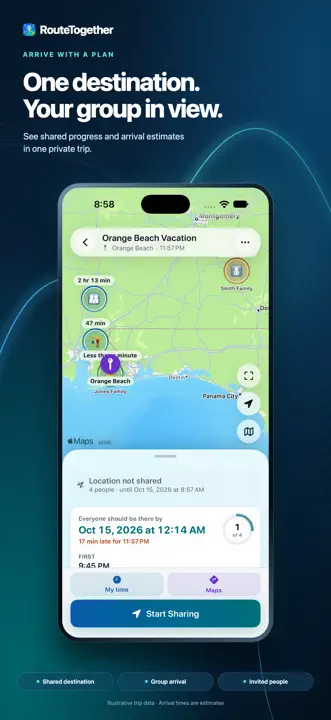
RouteTogether helps family and friends traveling separately coordinate one shared destination. Create a temporary trip, invite your group through private iCloud sharing, and see the latest shared progress and arrival estimates in one place.
Create a shared trip
Choose a destination, an optional planned arrival, and a trip note. Invite your group through private CloudKit sharing. Real shared trips require iCloud.
See shared arrival estimates
View current trip status and the group’s latest shared arrival estimate. RouteTogether shows driving, stopped, paused, delayed, stale, and arrived states, and makes missing estimates clear.
Read more
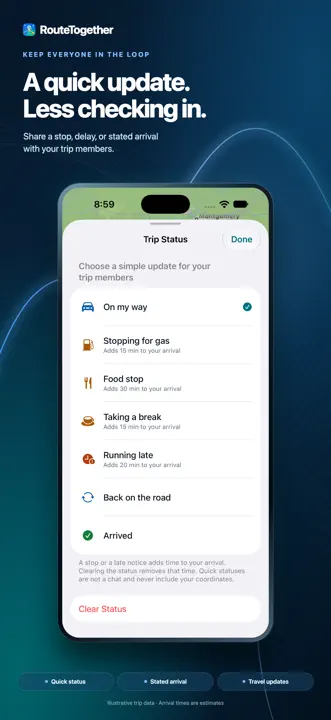
Keep the group in the loop
Share a quick update for a gas stop, meal, break, or delay. State your arrival time without sharing a coordinate. Gas, food, and break statuses clear when you drive on under the app’s stop policy. People riding together can follow their driver’s arrival.
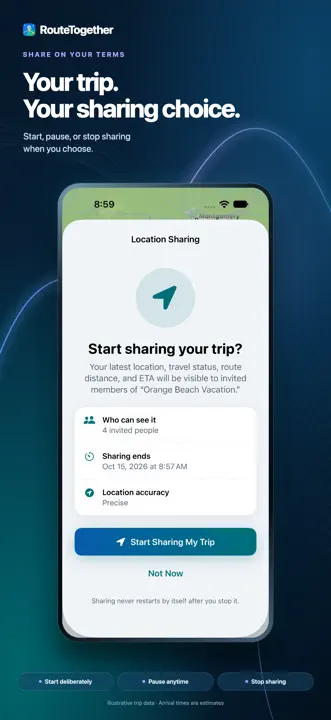
Share on your terms
Start, pause, resume, or stop your own location sharing. Choose a fixed sharing window or a trip that ends when everyone arrives. RouteTogether keeps one current location record per participant rather than a route history. Background location is used only during a deliberate active sharing session when you enable background ETA updates and grant permission.
Built for iPhone and iPad
See trip summaries in widgets and a Live Activity, use layouts that adapt to the available space, and choose light or dark appearance with six color themes.
Privacy choices
Trips are shared with invited people who accept. There are no ads. Optional first-party usage analytics start off and have editable Settings controls; returning-use measurement is a separate opt-in. Analytics exclude private trip content, destinations, coordinates, routes, and ETA values.
Route and arrival estimates depend on Apple Maps, location accuracy, connectivity, and available map information. RouteTogether coordinates arrivals; open the destination in Apple Maps for turn-by-turn navigation. It is not an emergency or safety-monitoring service.
Privacy at a glance
What happens to your data.
Apple’s App Store privacy labels remain the authority for the app’s current data practices.
What’s new Version 1.0.2
- Gas, food, and break statuses now return to Back on the road once a driving update confirms the stop has ended, so stop time no longer keeps extending your arrival estimate.
- A new optional usage prompt lets you choose whether to help improve RouteTogether. Activity starts off, either answer is remembered, and the choice stays editable in Settings. Returning-use measurement remains a separate opt-in.
- Refreshed App Store artwork highlights shared trips, quick updates, and sharing controls.
FAQ
Common questions
How do I get help?
Email support@brentgaddis.com or use the contact options on this page. Include the app name (RouteTogether), your Apple device, and a short description of what happened. I read every message myself.
Related apps
You might also like.


RV Fuel Pro
Log RV fill-ups and understand fuel spending, MPG, range, cost per mile, and monthly trends.
Learn more $1.99

MapBridge Pro
Open shared places and directions in the maps app you choose.
Learn more $1.99

DebtLens
Make monthly debt check-ins clear, compare payoff strategies, and see progress at a glance.
Learn more $2.99Support and privacy