

Photo & Video
FinalPic
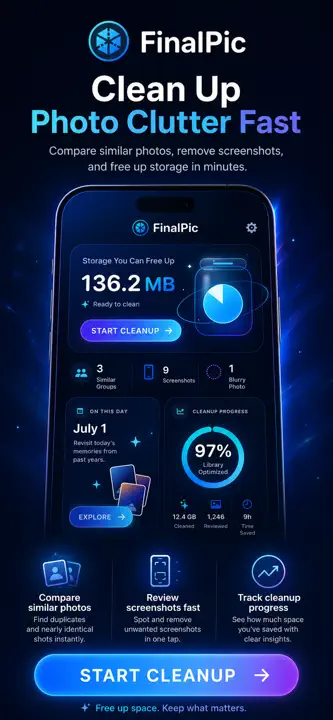
Clean up photo clutter with side-by-side choices and a review-first workflow that keeps you in control.
$2.99
Available on iPhone & iPad
- iPhone
- iPad
Prices can vary by region. The App Store shows the current price.

A closer look
See more of FinalPic.


About FinalPic
Clean up photo clutter
FinalPic helps you reclaim storage by turning photo clutter into quick, confident cleanup sessions.
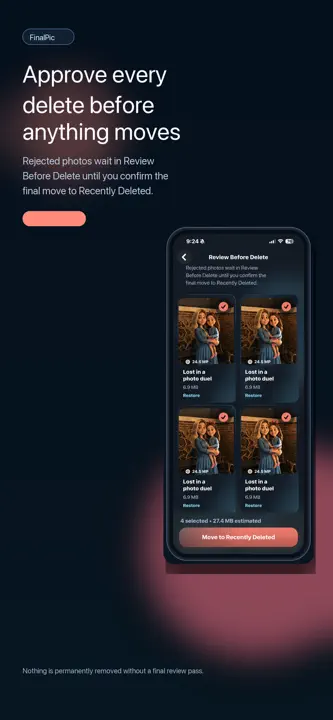
Compare similar photos side by side, tap the one you want to keep, and move the rest into a pending review queue instead of deleting them immediately. Screenshots stay in their own cleanup flow, and every removal still passes through Recently Deleted so you stay in control.
Use FinalPic to:
- Compare similar photos one tap at a time
- Keep your favorite 1 to 5 photos from a burst
- Review screenshots separately from memories
- Restore photos before the final delete step
- Track how much storage your cleanup sessions reclaim
One purchase. No subscriptions.
Highlights
What FinalPic does best.
- 01
Compare similar photos side by side
- 02
Keep 1–5 favorites and review the other choices before deletion
- 03
Review screenshots separately and track reclaimed storage
How it works
Step by step.
- Choose a focused cleanup session for similar photos or screenshots.
- Select the photos worth keeping and review everything else in the pending queue.
- Confirm removals through Apple’s Recently Deleted workflow when you are ready.
Privacy at a glance
What happens to your data.
FinalPic analyzes a photo library on the device to help you review it. It does not require a FinalPic account or use a developer CloudKit photo database.
What’s new Version 8
Added native iPad support with responsive layouts for full screen, Split View, Stage Manager, portrait, and landscape.
FAQ
Common questions
Why is a scan incomplete, pending, or unable to analyze some photos?
Confirm FinalPic has the Photos access you intended. Originals stored only in iCloud may need time, network access, and local space to download. Large libraries can require multiple foreground sessions. Keep the app open while scanning and review any Pending section; a capped or interrupted scan should not be treated as a complete library assessment.
Does FinalPic automatically delete photos or guarantee that photos are duplicates?
No. FinalPic makes on-device recommendations and requires your choices plus Apple’s system deletion confirmation. Similarity and quality assessments can be wrong, and capture batches based on time are not proof of duplicate content. Review every selected item before confirming.
Where do confirmed deletions go?
Apple Photos normally moves confirmed items to Recently Deleted, subject to Apple’s Photos behavior and iCloud Photos synchronization. FinalPic cannot bypass the system confirmation or promise recovery. Check Recently Deleted promptly if you made a mistake, and understand that changes may propagate to other devices using iCloud Photos.
Who handles App Store billing or refund requests?
Apple processes App Store purchases and eligible refund requests and does not provide FinalPic with your full payment-card details. Use Apple’s Report a Problem service or Apple Support for a billing or refund request. Contact FinalPic support for an app-function problem.
Can FinalPic guarantee duplicate, quality, or savings results?
No. Similarity, quality, best-shot, screenshot, date, face-count, text, QR, and storage-savings findings are on-device estimates and can have false positives or miss items. Review every asset, Live Photo or RAW companion, edit, album context, and estimated size before approving a deletion or optimization. Keep an independent backup of irreplaceable media.
Related apps
You might also like.

PulseDrive
Copy photos and videos from an iPhone or iPad to a USB-C flash drive.
Learn more $1.99
CloudNest
Choose the Mac files that matter, keep scheduled versioned snapshots, and restore individual files or folders.
Learn more $2.99
RemoteLens Pro
Use one nearby iPhone or iPad as the camera and another as its live viewfinder and remote.
Learn more $2.99Support and privacy