

Health & Fitness
PulseLife Vitals
Bring available health signals into a clearer weekly view of sleep, movement, heart trends, energy, and records.
Free
Available on iPhone & iPad
- iPhone
- iPad
Prices can vary by region. The App Store shows the current price.


A closer look
See more of PulseLife Vitals.



About PulseLife Vitals
Your health trends, clearer
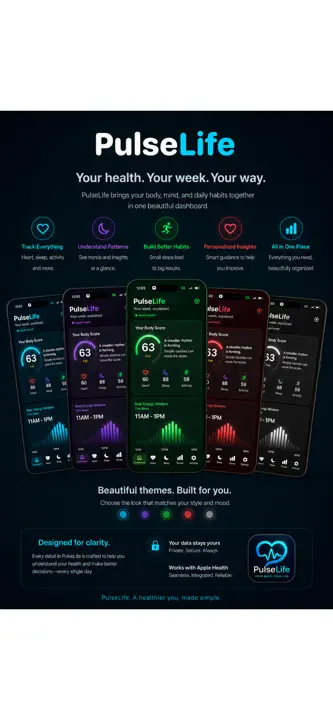
PulseLife Vitals turns your health data into a cleaner, easier-to-understand weekly dashboard.
Instead of making you dig through separate screens, PulseLife Vitals brings your available health signals together in one modern view. See your Body Score, weekly sleep, movement, heart trends, energy patterns, monthly history, and personal records without needing an account or a cloud database.
Features include:
- Body Score based only on the health data PulseLife can see
- Weekly dashboard for sleep, steps, heart, energy, recovery, and activity
- Clickable score breakdowns that explain what helped, what lowered the score, and what could improve it
- Sleep details including last night’s duration, bedtime, wake time, weekly average, and sleep stages when available
- Trends and records views for best sleep, highest steps, heart trends, monthly movement, and personal records
- Customizable widgets for Body Score, sleep, steps, heart, and energy
- Bright neon themes including Blue, White, Pink, Purple, Green, and Red
- No account required
- No cloud database in version 1
- Scoring stays local on device
PulseLife Vitals is designed for general wellness awareness and personal trend tracking. It does not diagnose, treat, or replace medical advice. Scores are local summaries of available health records and should be used as simple context for your week.
Highlights
What PulseLife Vitals does best.
- 01
Weekly Body Score with an explainable breakdown
- 02
Sleep, movement, heart, energy, recovery, and activity trends
- 03
Customizable widgets for key health signals
How it works
Step by step.
- Allow PulseLife Vitals to read the health records you choose.
- Review the weekly dashboard and tap into each available signal.
- Use trends, records, and widgets as context for your general wellness.
Privacy at a glance
What happens to your data.
PulseLife Vitals reads authorized Apple Health data and calculates summaries on the device. It does not require a PulseLife account, cloud database, advertising service, or analytics service.
FAQ
Common questions
Why is a metric or score missing?
Health data is available only when a compatible device or app has written it and you granted PulseLife read access. Some signals, including wrist temperature, HRV, VO2 max, or detailed sleep stages, are not produced for every person or device. Open Apple Health to check sources and permissions.
Why does a widget or trend look stale?
Open PulseLife to refresh its local summary, confirm the widget is installed, and allow iOS or iPadOS time to update the widget. Health samples can also arrive later from Apple Watch or another source. Re-adding the widget can refresh presentation state.
Are scores a diagnosis or medical recommendation?
No. PulseLife shows informational calculations from available Health data. It does not diagnose, treat, monitor emergencies, or replace a clinician. Do not delay care because of a score. Contact emergency services for urgent symptoms and a qualified professional for medical advice.
Who handles App Store billing or refund requests?
Apple processes App Store purchases and eligible refund requests and does not provide PulseLife Vitals with your full payment-card details. Use Apple’s Report a Problem service or Apple Support for a billing or refund request. Contact PulseLife Vitals support for an app-function problem.
How do I change Health access or clear the widget snapshot?
Grant or revoke access in the Health app under your profile > Apps and Services > PulseLife, or in Settings > Privacy & Security > Health. Confirm a compatible source has written samples, then open PulseLife to refresh. Revoking access stops future reads but may not erase the last local widget snapshot. Remove the widget and delete the app and its data to clear retained local app-group information.
Related apps
You might also like.

Prayer Ledger
Share a prayer publicly and anonymously, lift someone else up, and see the care moving both ways.
Learn more Free
DebtLens
Make monthly debt check-ins clear, compare payoff strategies, and see progress at a glance.
Learn more $2.99
CloudNest
Choose the Mac files that matter, keep scheduled versioned snapshots, and restore individual files or folders.
Learn more $2.99Support and privacy