

Photo & Video
VirtualCam Pro
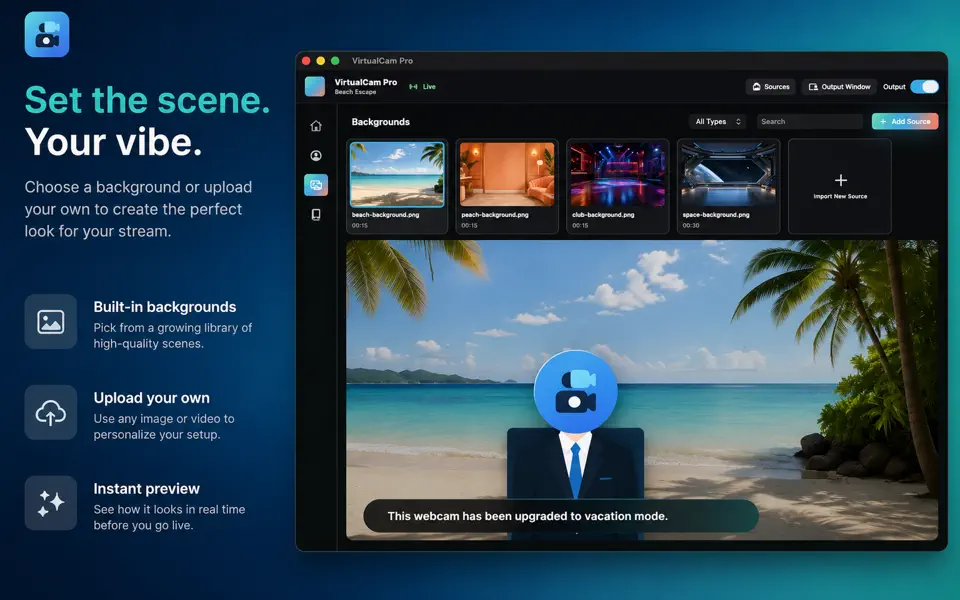
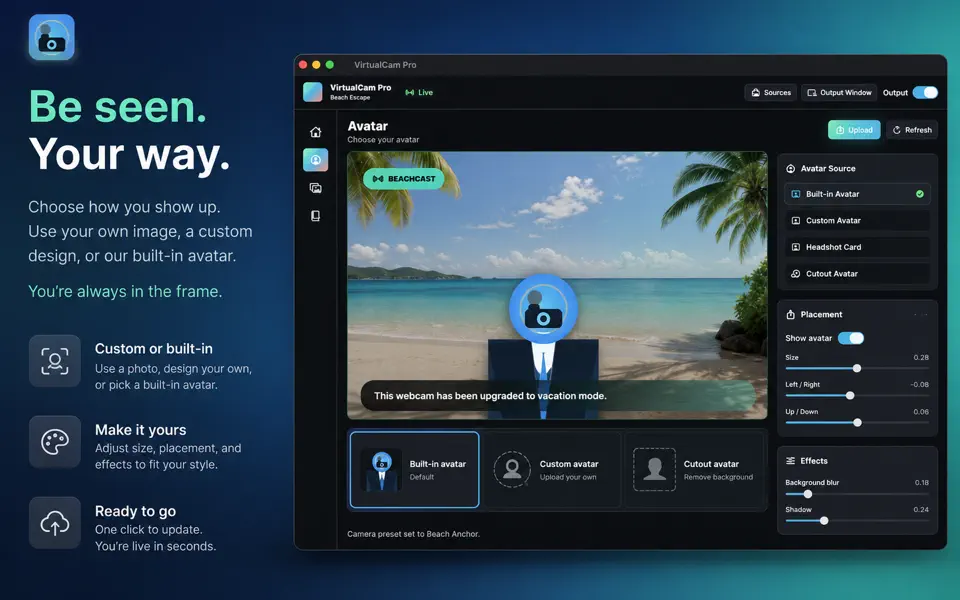
Build custom video-call scenes with backgrounds, avatars, badges, lower thirds, and saved looks.
$2.99
Available on Mac
- Mac
Prices can vary by region. The App Store shows the current price.

A closer look
See more of VirtualCam Pro.
About VirtualCam Pro
Fun virtual camera studio
Turn a photo, slide, or graphic into a camera source for your Mac video apps.
VirtualCam Pro adds a separate virtual camera. Choose a photo in the studio, then select VirtualCam Pro as the camera in a compatible video app. Switch photos during a call using the library, keyboard shortcuts, or menu bar panel.
Make it yours
Add a lower third for your name and role, a status pill, a scrolling ticker, and text or image layers. Choose Fit to show the whole photo over a blurred background, or Fill to cover the frame. Save the complete look as a scene and restore it with one click.
Pause with a message
Pause the feed to show a customizable away card. Resume when you are ready. An optional setting keeps your last frame available after the app closes.
Read more
Local by design
Photos, image layers, and scenes stay on your Mac. VirtualCam Pro does not record your real camera, microphone, or screen. Your meeting app controls what it transmits during a call.
Setup
Install the app in Applications and approve its camera extension when macOS asks. If prompted, restart your Mac. Reopen your video app and choose VirtualCam Pro in its camera selector. Compatibility depends on the receiving app’s support for macOS virtual cameras.
Output: 1280 x 720 at 30 fps. Photo and image imports only; video-file playback and the former Avatar and sticker features are not included.
Highlights
What VirtualCam Pro does best.
- 01
Custom backgrounds, avatars, uploaded cutouts, badges, and lower thirds
- 02
Quick sources and live on-screen text
- 03
Saved looks for meetings, streams, demos, and playful calls
How it works
Step by step.
- Choose a background and add an avatar or uploaded cutout.
- Arrange badges, live text, and lower-third details.
- Save the look and switch scenes when the moment changes.
Privacy at a glance
What happens to your data.
VirtualCam Pro copies selected images into local app storage, renders a 1280×720 image feed through a macOS camera extension and shared app-group container, and stores scene settings locally. The version does not use a real camera, microphone, screen recording, account, developer cloud, analytics, advertising, purchases, or notifications. Receiving apps and participants control anything they record or retain.
What’s new Version 3.1
A redesigned Mac studio brings your photos, camera preview, and optional overlays together in one window.
- Switch photos from the library, number keys, or menu bar.
- Add a name and title, status pill, scrolling ticker, text, or a logo.
- Show a custom away card when you pause the feed.
- Fit the whole photo over a blurred background or fill the frame.
- Save and restore complete scenes, including their layers.
- Keep the last camera frame available after closing the app when enabled in Settings > General.
- See clearer camera connection, extension update, and restart guidance.
- Preserve customized scenes during upgrades and protect photos used by saved scenes.
- Improved text editing, layer placement, and saving when quitting.
Ticker animation runs in the camera extension for smooth output. The app also displays an animated preview.
The Avatar feature, stickers, and joke presets have been removed. Photo libraries and compatible saved scenes are retained.
FAQ
Common questions
Why does VirtualCam Pro not appear in another app?
Keep VirtualCam Pro in /Applications, open Settings > Camera and install or repair the Camera Extension, then approve it in System Settings > General > Login Items & Extensions > Camera Extensions. Fully quit and reopen Zoom, Teams, FaceTime, or the receiving app. Restart the Mac if macOS stages the extension change.
What media does the current version import?
The reviewed version imports image formats such as PNG/APNG, GIF, HEIC, JPEG, TIFF, and WebP. It does not import video. Selected, dragged, or pasted images are copied into VirtualCam Pro’s Application Support, so moving or deleting the original does not remove the app copy.
Why is the feed stale, blank, or still visible after quitting?
Keep an active scene, then use Refresh Feed or Pause/Go Live and reopen the receiving app. Settings > Camera includes Keep the camera running after I quit; when enabled, the extension can continue showing the last rendered image after the main app quits or restarts. Turn that setting off before quitting if the last frame should not remain available.
How do I remove the extension and local media?
First use VirtualCam Pro > Settings > Camera > Remove Camera, approve the change in System Settings, quit receiving apps, and restart if requested. Then remove imported backgrounds, avatars, overlays, and scenes with in-app controls before moving the app to Trash. Removing the extension alone does not remove media or state, and deleting a scene or overlay may leave copied asset files. Contact support for guided cleanup of the app sandbox and shared app-group container after extension removal.
Who handles App Store billing or refund requests?
Apple processes App Store purchases and eligible refund requests and does not provide VirtualCam Pro with your full payment-card details. Use Apple’s Report a Problem service or Apple Support for billing; contact VirtualCam Pro support for app behavior.
Related apps
You might also like.

CoreAura
See live CPU, memory, storage, battery, network, drive, and connected-device signals in one Mac dashboard.
Learn more $2.99
NightKeep
Protect and organize sensitive files in a local, encrypted vault on iPhone, iPad, and Mac.
Learn more $2.99
FinalPic
Clean up photo clutter with side-by-side choices and a review-first workflow that keeps you in control.
Learn more $2.99Support and privacy